# Using Mobile Web Access

<div id="bkmrk-%C2%A0"> </div><div id="bkmrk-overview"><div><div><div><span style="background-color: #ffffff; color: #00ccff;">**Overview**</span></div><div></div></div></div></div><span style="background-color: #ffffff; color: #ffcc00;">With MailStore Mobile Web Access you can access the MailStore archive regardless of your location using a smart phone. In addition to browsing the folder structure and viewing archived email, the mobile web access also allows you to search the archive.</span>

## <span class="mw-headline" id="bkmrk-mailstore-mobile-web-0" style="color: #0000ff;">MailStore Mobile Web Access</span>

Stock web browsers on the following platforms are officially supported:

- Apple iOS 3.2 or higher
- Android 2.3 or higher
- Windows Phone 7.5 or higher
- Blackberry 7 or higher

Other 3rd party web browsers on those or other mobile platforms may also work, but are not officially supported.

# <span class="mw-headline" id="bkmrk-requirements-for-usi-0">Requirements for Using MailStore Mobile Web Access</span>

Activation and configuration of MailStore Mobile Web Access are done using the [MailStore Server Service Configuration](http://en.help.mailstore.com/MailStore_Server_Service_Configuration "MailStore Server Service Configuration"). A list of supported internet browsers is available under [System Requirements](http://en.help.mailstore.com/System_Requirements "System Requirements").

# <span class="mw-headline" id="bkmrk-accessing-mailstore--0">Accessing MailStore Mobile Web Access</span>

Unless MailStore Server is configured otherwise, users can access MailStore Mobile Web Access using the following internet addresses:

<div id="bkmrk-http%3A%2F%2F%3A8461%2Fm-https"><div><div>```
http://:8461/m
https://:8462/m
```

</div></div></div>Please replace with the actual name or the IP address of the computer on which MailStore Server is installed.

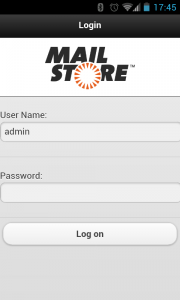
<div id="bkmrk-"><div>[![Accs mobile web 01.png](http://en.help.mailstore.com/images/thumb/1/1e/Accs_mobile_web_01.png/180px-Accs_mobile_web_01.png)](http://support.quikbox.com/article.php?id=272)</div></div>To log in to MailStore Mobile Web Access, please fill out the fields *User Name* and *Password* and click on *Log on*. Please keep in mind that the user name must always match the user's MailStore name.

## <span class="mw-headline" id="bkmrk-search-by-folder-str-0">Search by Folder Structure</span>

- After login, a list of all readable user archives appears.
- To open a user archive or a folder, simply tap on it.
- To return to the previous screen, tap on the *Back* button in the upper left corner.
- To view the emails in a folder, tap on emails in the folder.
- To view an email, simply tap on it.

## <span class="mw-headline">[![Accs mobile web 02.png](http://en.help.mailstore.com/images/thumb/c/c7/Accs_mobile_web_02.png/120px-Accs_mobile_web_02.png)](http://support.quikbox.com/article.php?id=272)</span>

<span class="mw-headline">[![Accs mobile web 03.png](http://en.help.mailstore.com/images/thumb/a/a9/Accs_mobile_web_03.png/120px-Accs_mobile_web_03.png)](http://support.quikbox.com/article.php?id=272)</span>

<span class="mw-headline">[![Accs mobile web 04.png](http://en.help.mailstore.com/images/thumb/0/0d/Accs_mobile_web_04.png/120px-Accs_mobile_web_04.png)](http://support.quikbox.com/article.php?id=272)</span>

<span class="mw-headline">[![Accs mobile web 05.png](http://en.help.mailstore.com/images/thumb/b/b5/Accs_mobile_web_05.png/120px-Accs_mobile_web_05.png)](http://support.quikbox.com/article.php?id=272)</span>

## <span class="mw-headline" id="bkmrk-full-text-search-0">Full Text Search</span>

- To search for a specific keyword, first go to the archive to be searched. (Subfolders are included in the search).
- Tap on *Search*.
- Enter the keyword and tap on *Search* again.
- The search results are displayed.
- To view an email, simply tap on it.

[![Accs mobile web 06.png](http://en.help.mailstore.com/images/thumb/4/44/Accs_mobile_web_06.png/120px-Accs_mobile_web_06.png)](http://support.quikbox.com/article.php?id=272)

[![Accs mobile web 07.png](http://en.help.mailstore.com/images/thumb/c/c9/Accs_mobile_web_07.png/120px-Accs_mobile_web_07.png)](http://support.quikbox.com/article.php?id=272)

[![Accs mobile web 05.png](http://en.help.mailstore.com/images/thumb/b/b5/Accs_mobile_web_05.png/120px-Accs_mobile_web_05.png)](http://support.quikbox.com/article.php?id=272)